
A Discord ticket bot with transcripts
Members open a private support channel with one click, your staff claim it, and when it closes a transcript lands in the channel you choose. You set Ruination Bots up entirely in the dashboard, without code, and the bot runs under your own name. This page shows how the ticket system works, what you can configure and where your transcripts are kept.
Last updated:How a ticket runs
- The member picks a categoryIn the panel they click a button or choose a category from the dropdown, for example Support, Report or Ban appeal.
- Optional: questions before openingDiscord shows a form with up to five questions. The answers are posted as the first message in the ticket, so your staff do not have to ask again.
- A private channel is createdThe bot creates a text channel that only the member, the bot and your staff roles can see. The name follows your pattern, such as
📩┃support-0042. - Your staff claim itWith Claim, a staff member shows they are taking care of it. If two click at the same moment, one wins, and the button is greyed out afterwards.
- Close, transcript, doneThe member or your staff close the ticket, with a confirmation step if you want one. The channel is deleted, and the transcript is posted as an HTML file in the transcript channel.
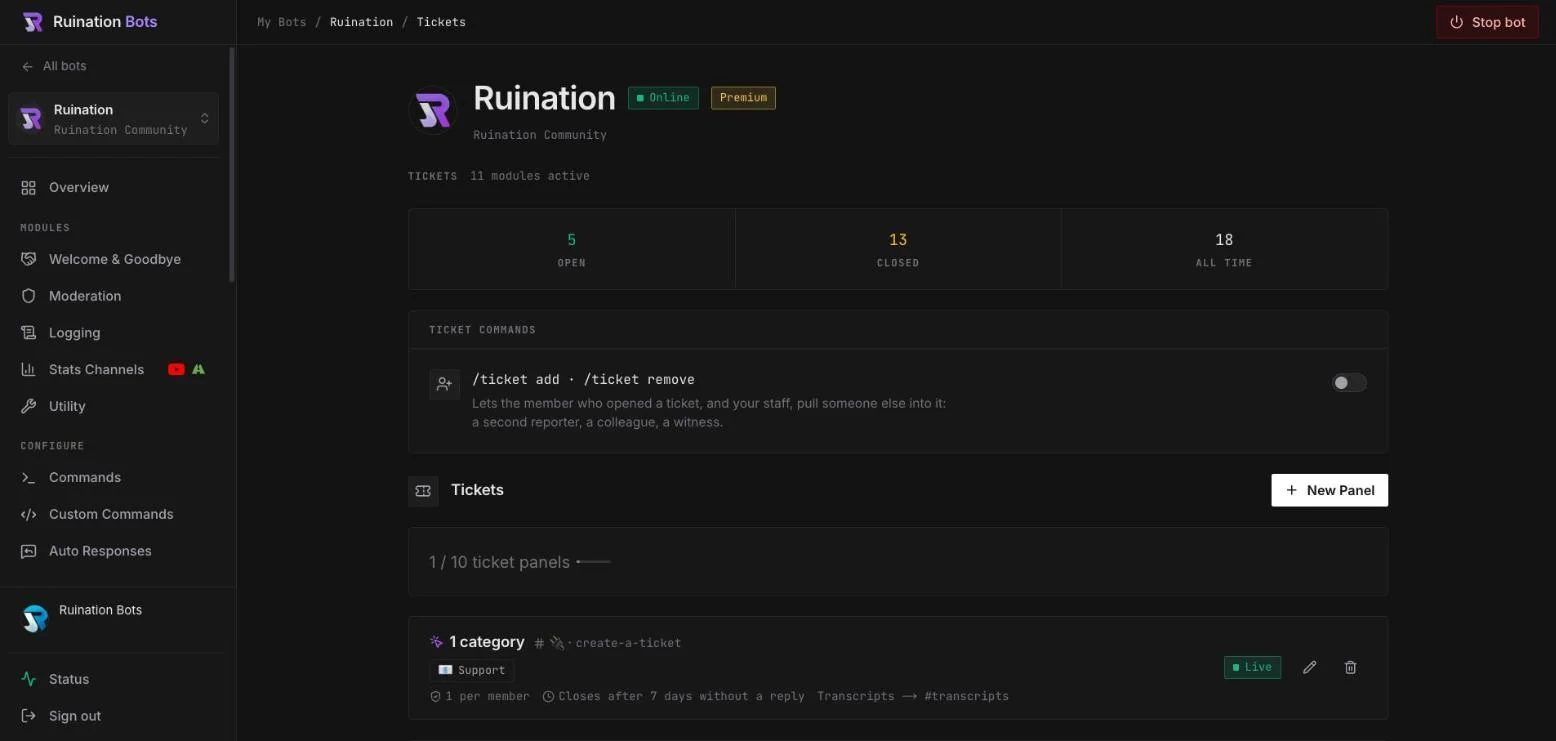
What you can configure
| Setting | What is possible |
|---|---|
| Panels | Up to 10 per bot, each in its own channel |
| Categories | Up to 5 as buttons, or up to 25 in a dropdown |
| Panel message | Plain text or an embed, in your own words |
| Per category | Name, description, emoji, button colour, the Discord category the channels go into, channel name, first message in the ticket |
| Staff roles | Up to 10 per category. Anyone with “Manage Server” counts automatically |
| Who may open | Everyone, or only certain roles (up to 10) |
| Questions before opening | Up to 5, short or long, each optionally required |
| Open tickets per member | 1 to 5 per panel, at most 10 in total |
| Cooldown | Up to one hour between two tickets, 30 seconds by default |
| Ping staff | When a ticket opens, on or off |
| Confirm before closing | On or off |
| Add members | With /ticket add and /ticket remove, up to 5 per ticket |
| Bot language | English or German |
Closing tickets nobody answers: when your staff have replied and the member then stays silent, the bot closes the ticket after a period you set, between 12 hours and 30 days. The member gets a reminder at 75% of that period. Tickets your staff have not replied to yet, and claimed tickets, are never closed automatically.
A member leaves the server: their open tickets are closed automatically, with a transcript if you have set a transcript channel.
Transcripts: where they are kept and who can read them
When a ticket closes, the bot builds an HTML file such as ticket-0042.html. It contains the last 500 messages, embedded images and text attachments, and a footer with the category, the time it was opened and who opened and closed it. The file opens in any browser.
The bot posts it in the transcript channel you set for the panel. Whoever can see that channel in Discord can read the transcripts, so you control access the usual way, through the channel permissions of your server.
What we store, and for how long:
- The conversation itself does not leave Discord. We do not keep a copy of the transcript.
- We hold only administrative data such as the ticket number, status, category and who opened, claimed and closed the ticket.
- Closed tickets are deleted from our database automatically after 90 days.
- If a member asks for their data to be erased, you erase them in the dashboard by their Discord ID. Their closed tickets are deleted and their name is removed from other people’s tickets. Open tickets are shown to you so you can close them first.
- The HTML files in your transcript channel belong to your server. How long you keep them is your decision, and you can delete them like any other message.
The rest is in the privacy policy. For your members’ data there is a data processing agreement under Art. 28 GDPR.
Setting up a ticket system in Discord
- Create your botIn the Discord Developer Portal, free of charge. The setup guide shows every click with screenshots.
- Connect it to Ruination BotsPaste the token into the dashboard and invite the bot to your server with the Administrator permission.
- Create a panelUnder Tickets choose New Panel, the channel for the panel and whether members pick by button or dropdown.
- Add categoriesFor each category you set the staff roles, the channel name and the first message, and the questions before opening if you want them.
- Choose the transcript channelIdeally a channel only your staff can see. Then save the panel.
What the bot does not do
So that you do not find out after setting it up:
- A closed ticket cannot be reopened. The member opens a new one.
- There is no rating after a ticket closes.
- You read transcripts in Discord, not in the dashboard.
- Tickets are opened through the panel, not by command.
- Tickets are private channels, not threads.
- The bot records a close reason only when it closes a ticket itself, for example for inactivity.
Switching from Ticket Tool or another ticket bot
You can run both bots side by side for a while. Create your panel in Ruination Bots, post it in a new channel, and remove the old panel once the open tickets in the old bot are closed. Transcripts from the old bot stay wherever it put them.
The difference is less in the single ticket than in everything around it: the same bot also handles moderation, welcome messages, leveling and stream alerts on your server, and it appears in the member list under your name, not ours.
Try it on your server
You get the whole product for 14 days without a card, once per account and once per Discord server. Afterwards the bot stops, nothing is charged and your setup is kept.
Questions
Is the ticket bot free?
You can try everything for 14 days without a card, once per account and once per Discord server. Afterwards the bot stops, and your setup is kept. Core costs €5,99 a month for one bot, Pro €9,99 for three. Tickets and transcripts are fully included in every plan and in the trial.
Can tickets be threads instead of channels?
No. Every ticket is a private text channel that only the member, the bot and your staff roles can see. Put the channels under their own Discord category and the channel list stays tidy.
Where do I find the transcripts?
In the transcript channel you set for the panel. The bot posts one HTML file per ticket there when it closes. Without a transcript channel, no transcript is created.
How many tickets can one member have open at once?
You set 1 to 5 per panel. Across all panels the limit is 10 per member and 100 open tickets per server.
Which languages does the bot speak?
English or German, which you set per bot. The texts you write yourself, such as the panel message or the first message in a ticket, are entirely yours.
Does the ticket bot run under my own name?
Yes. You create the bot yourself in Discord, so it carries your name and your avatar. Ruination Bots only hosts it. How that works.